Jenkins is powerful. It's also from 2011, requires a dedicated server, a plugin ecosystem that regularly breaks, and a Groovy DSL most developers never fully learn. Here's an honest comparison.
Background
Understanding what each platform actually is helps explain why the comparison isn't just "features" — it's a different philosophy about who owns the infrastructure.
Jenkins is an open-source automation server originally developed as "Hudson" at Sun Microsystems in 2004. After Oracle acquired Sun in 2010, the project forked and relaunched as Jenkins in 2011. It is written in Java and runs as a standalone server you deploy and manage yourself.
Its power comes from a massive plugin ecosystem — over 1,900 community-maintained plugins cover virtually every integration. The trade-off is that every plugin has its own release cycle, compatibility matrix, and maintenance status. Breaking changes between plugins and core Jenkins versions are a well-known operational hazard.
Buddy is a cloud-native CI/CD platform launched in 2015. It is a fully managed SaaS product — Buddy operates the infrastructure, applies security patches, and maintains all integrations. You interact with pipelines through a visual editor or YAML, without ever SSHing into a build server.
Pipelines are Docker-based, meaning every build step runs in an isolated container. Buddy maintains a curated library of 200+ pre-built actions covering popular cloud providers, deployment targets, test frameworks, and notification tools — each tested for compatibility on every release.
Setup complexity
The steps required to go from zero to a working build-test-deploy pipeline on each platform.
- pipeline: "Build & Deploy" on: "PUSH" refs: - "refs/heads/main" actions: - action: "Build Docker image" type: "DOCKERFILE" login: "DOCKER_HUB" - action: "Deploy to Kubernetes" type: "KUBERNETES_APPLY" cluster: "my-cluster"
The Jenkinsfile equivalent
pipeline { agent { docker { image 'node:18-alpine' args '-v /var/run/docker.sock:/var/run/docker.sock' // docker-in-docker workaround } } environment { DOCKER_IMAGE = "myapp:${env.BUILD_NUMBER}" REGISTRY_CREDS = credentials('docker-hub-creds') // must be configured in Jenkins UI first } stages { stage('Install') { steps { sh 'npm ci --prefer-offline' // no built-in cache — cache plugin required } } stage('Test') { steps { sh 'npm test -- --ci --coverage' } post { always { junit 'coverage/junit.xml' // JUnit plugin must be installed } } } stage('Build Image') { steps { script { // withDockerRegistry is from docker-commons plugin — must be installed withDockerRegistry([credentialsId: 'docker-hub-creds', url: '']) { def img = docker.build(env.DOCKER_IMAGE) img.push() img.push('latest') } } } } stage('Deploy') { when { branch 'main' } steps { withKubeConfig([credentialsId: 'k8s-config']) { // kubernetes plugin required sh "kubectl set image deployment/myapp myapp=${env.DOCKER_IMAGE}" } } } } post { failure { slackSend channel: '#builds', message: "Build failed: ${env.JOB_NAME}" // slack plugin } } }
This pipeline requires installing: Docker Pipeline plugin, Kubernetes plugin, JUnit plugin, Slack plugin, Docker Commons plugin — each managed separately.
Known pain points
These are structural issues with the Jenkins model — not bugs, but consequences of the self-hosted plugin architecture.
Plugin dependency hell
Each Jenkins plugin has its own version, its own dependencies, and its own compatibility matrix with Jenkins core. Updating one plugin can break three others. The Jenkins community acknowledges this as a systemic issue — there is no guarantee of cross-plugin compatibility.
"Plugin updates can introduce breaking changes. Always test updates in a non-production environment first." — jenkins.io documentation
Groovy DSL: a language within a language
Jenkins pipelines are written in Groovy — a JVM language most developers don't know. The Groovy sandbox imposes restrictions that cause scripts to fail silently. Declarative syntax reduces flexibility; Scripted syntax is a full programming language with all the footguns that implies.
"Methods not in the approved list will require an administrator to approve them in the Script Approval page." — Jenkins Pipeline documentation
Blue Ocean was abandoned
Jenkins' modern UI initiative, Blue Ocean, was officially deprecated in February 2022 and entered limited maintenance mode. The classic Jenkins UI — notorious for its early-2010s design — remains the primary interface. There is no actively developed visual pipeline editor in core Jenkins.
"The Blue Ocean UI has limited support and is not recommended for new pipeline configurations." — Jenkins project, 2022
Security patching is your problem
The Jenkins security team publishes security advisories regularly — often multiple per month. Each advisory may require updating Jenkins core, specific plugins, or both. In a self-hosted environment, you are responsible for applying patches before they are exploited. Jenkins has had critical RCE vulnerabilities in both core and popular plugins.
Master/agent architecture complexity
Scaling Jenkins for parallel builds requires setting up and maintaining agent nodes — virtual machines or containers that receive work from the Jenkins controller. Configuring JNLP agents, managing agent labels, handling agent disconnections, and keeping agent environments consistent is a significant operational burden.
Out-of-memory crashes under load
Jenkins runs on the JVM and its memory requirements grow with pipeline complexity, plugin count, and concurrent builds. OOM (OutOfMemoryError) crashes under heavy load are a common enough issue that there is extensive documentation on JVM heap tuning, executor limits, and disk cleanup strategies — all of which you manage manually.
Interface comparison
The gap in developer experience between Jenkins and Buddy becomes clear when you look at everyday tasks side by side.
Scenario: debugging a failing build
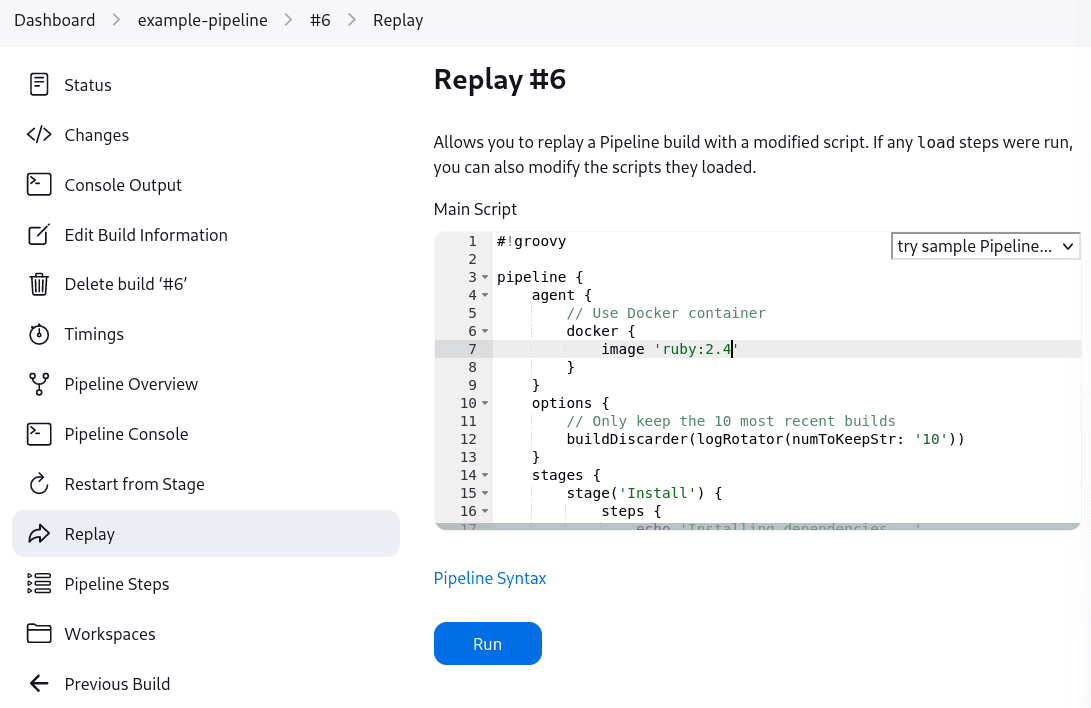
To re-run a build with a fix in Jenkins, you open the Replay screen and edit the raw Groovy DSL in a browser textarea. There's no validation, no autocomplete. You need to know the Groovy Pipeline API by heart — or guess. If you modified the Jenkinsfile and pushed to fix it, every change is a new commit in your git history.
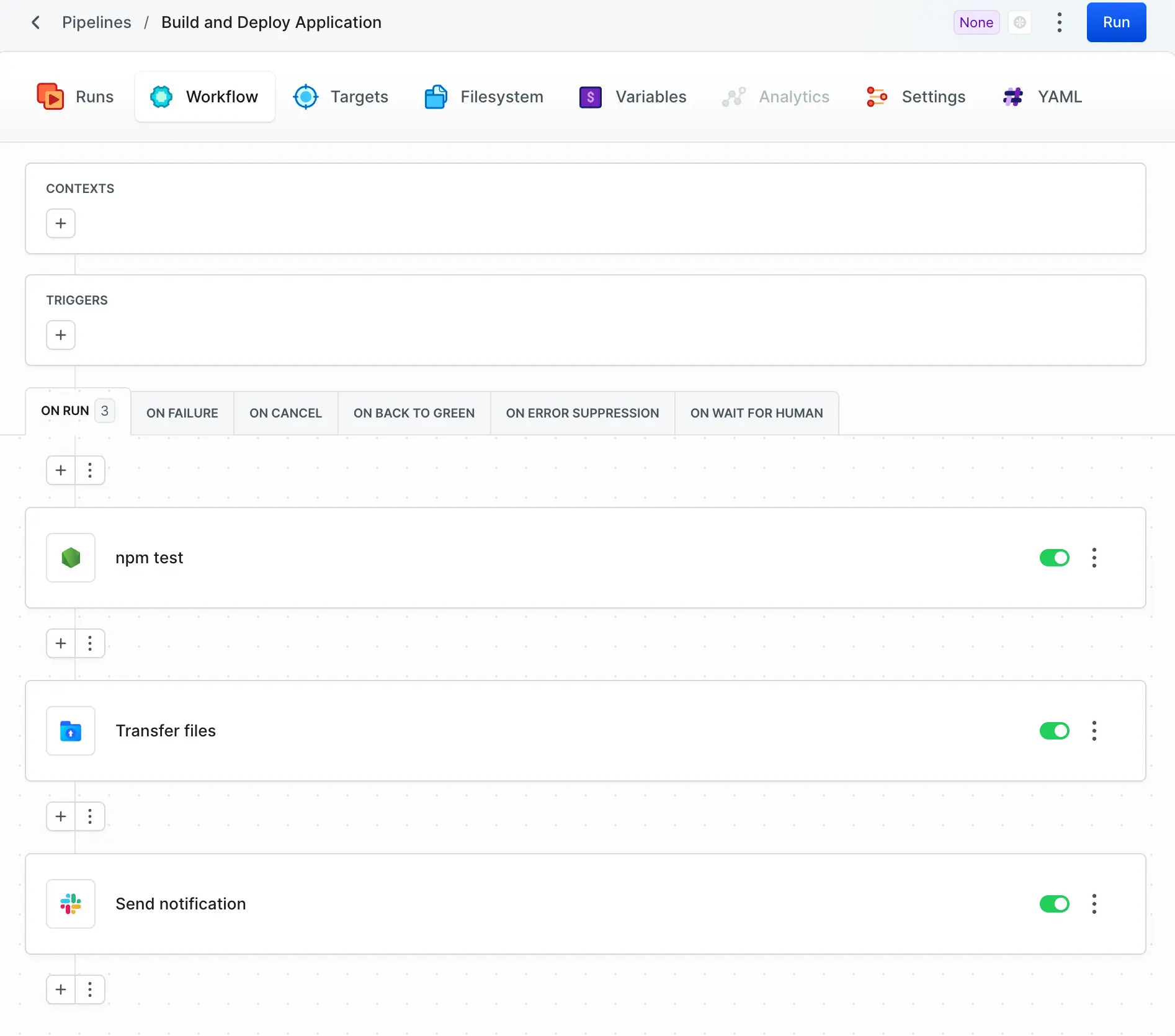
In Buddy, every pipeline action is a visual block you click to reconfigure. Notice the separate tabs: ON FAILURE, ON CANCEL, ON BACK TO GREEN, ON WAIT FOR HUMAN — failure handling is a first-class concept, not an afterthought bolted onto a Groovy post { failure { ... } } block.
Scenario: reviewing build history
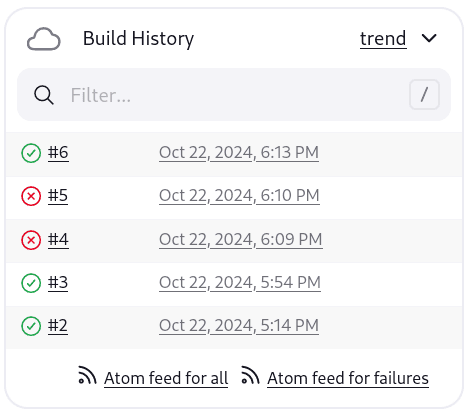
Jenkins build history is a flat numbered list — build #2, #3, #4… A green circle means pass, a red X means fail. Builds #4 and #5 failed here with no inline context on why. You click through to the console log to find out. There's no stage-level timing, no diff from the previous run, no trend visualization in this panel.
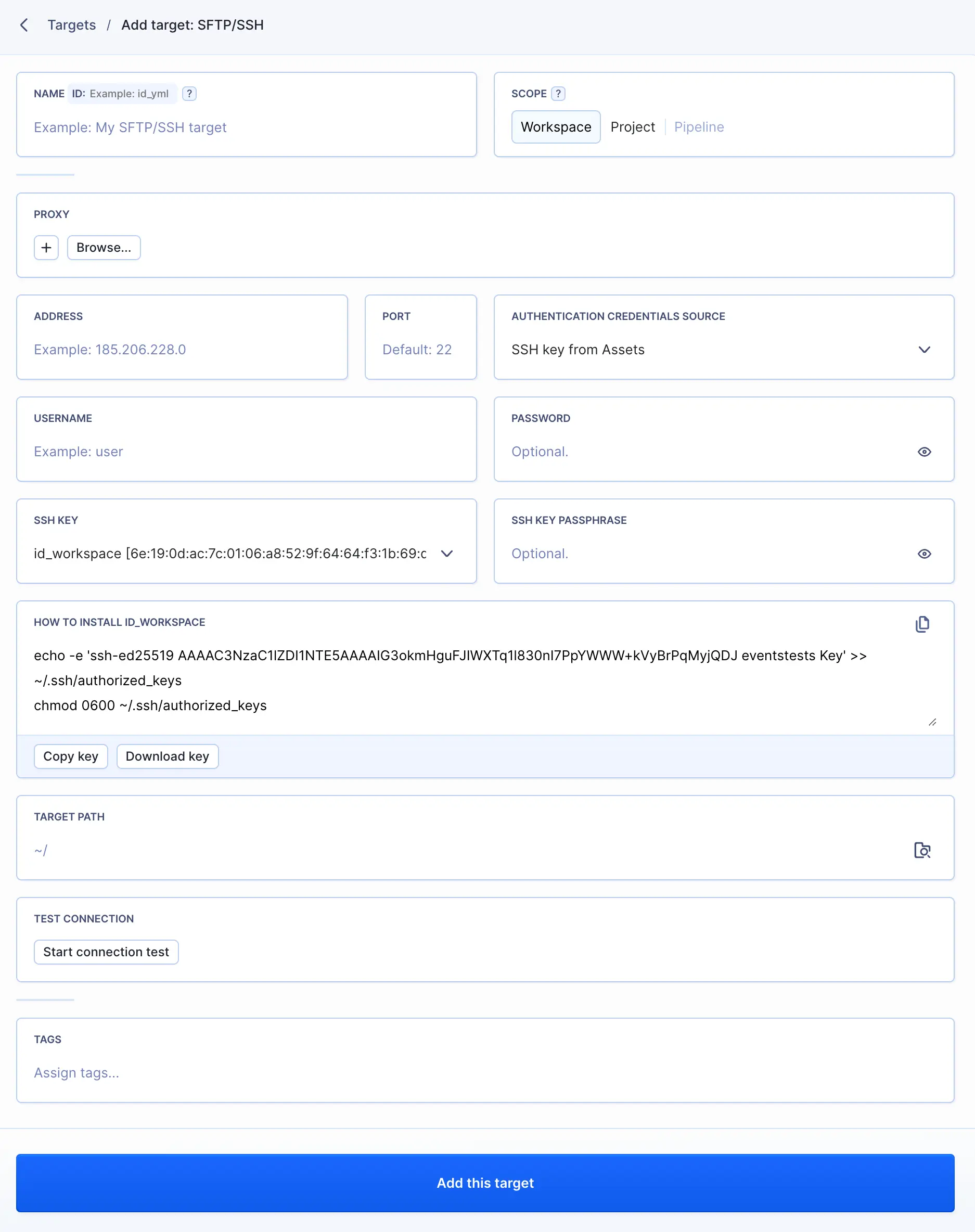
Adding a deployment server in Buddy is a single form. Buddy generates an SSH key pair automatically — you copy one command to run on your server to authorize it. Scope the target to the whole workspace, a single project, or one pipeline. In Jenkins, this requires the SSH Credentials plugin, manual key management, and editing multiple config screens.
Feature not available in Jenkins: built-in domain & hosting management
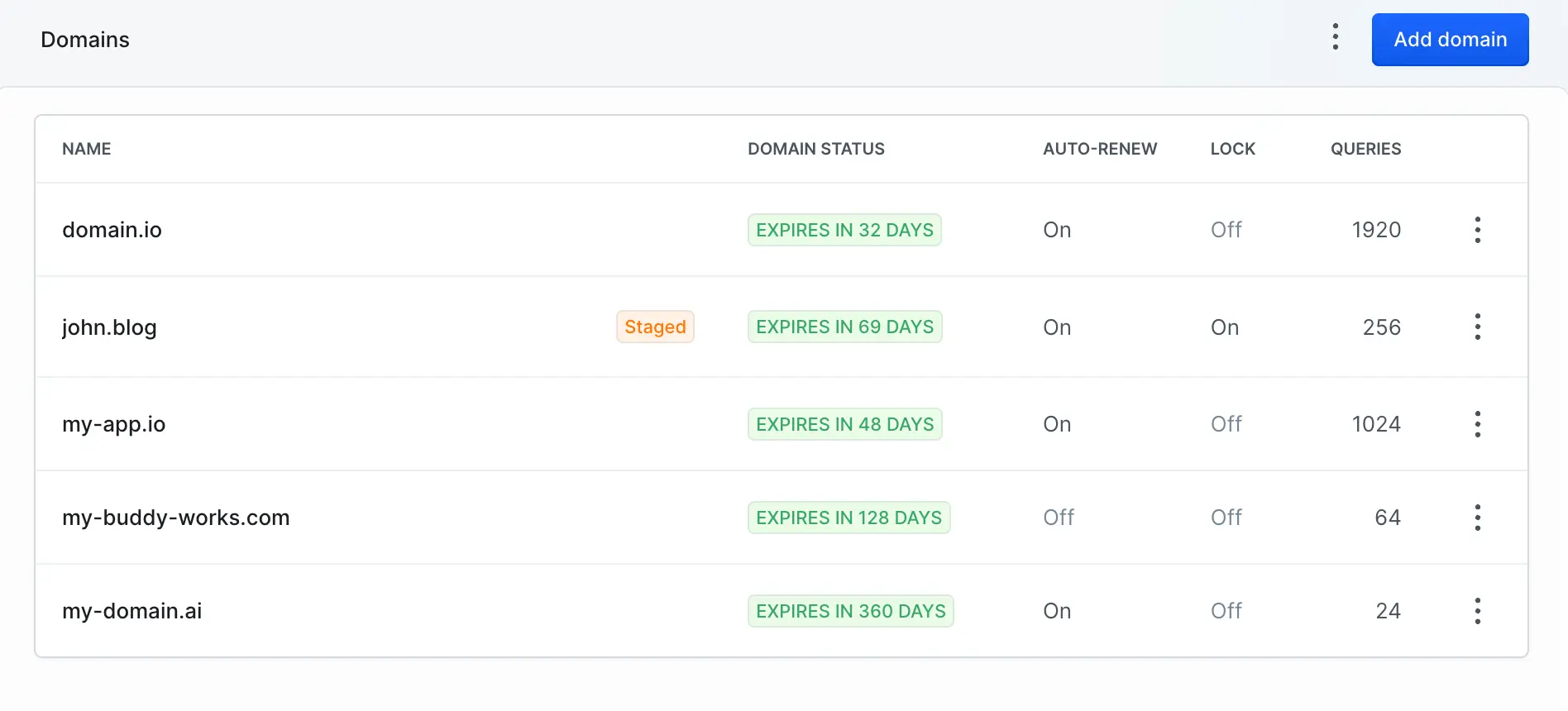
Buddy includes a domain registrar, CDN routing, and static hosting — all managed from the same platform as your pipelines. Register a domain, publish a build artifact, route the domain to it: done without leaving Buddy or touching a separate DNS provider. Jenkins has no equivalent — it's a build server, not a hosting platform.
Feature comparison
A detailed, category-by-category comparison of what each platform provides out of the box.
| Feature | Buddy | Jenkins |
|---|---|---|
| Infrastructure & Setup | ||
Zero-infrastructure setup No server to provision or maintain |
✓ | ✗ |
Automatic security patching CVEs patched without user action |
✓ | ✗ |
Managed TLS / HTTPS SSL certificates handled automatically |
✓ | ✗ |
High availability built-in No single point of failure |
✓ | Plugin |
Time to first pipeline From sign-up to first successful run |
< 5 min | 2–3 days |
| Pipeline & Configuration | ||
Visual pipeline editor Click-to-configure, no code required |
✓ | ✗ |
YAML pipeline definition Standard YAML syntax, IDE-friendly |
✓ | ✗ |
Pipeline-as-code Version-controlled pipeline definitions |
✓ | ✓ |
Parallel pipeline execution Run multiple pipelines simultaneously |
✓ | Plugin |
Conditional actions / branching If/when conditions in pipelines |
✓ | ✓ |
Pipeline templates / reuse Share pipeline definitions across projects |
✓ | Shared libs |
| Docker & Containers | ||
Native Docker support No plugin required |
✓ | Plugin |
Docker layer caching Reuse unchanged layers between builds |
✓ | ✗ |
Docker-in-Docker (DinD) Build images inside containers |
✓ | Workaround |
Private registry support ECR, GCR, Docker Hub, custom |
✓ | Plugin |
| Hosting & Environments | ||
Sandboxes / preview environments On-demand environments per branch or PR |
✓ | ✗ |
Built-in artifact hosting Store and serve build artifacts natively |
✓ | Plugin |
Static site hosting Deploy and serve static builds directly |
✓ | ✗ |
| Team & Security | ||
Role-based access control (RBAC) Fine-grained permissions per project |
✓ | Plugin |
SSO / SAML integration Enterprise identity provider support |
✓ | Plugin |
Secrets management Encrypted credential storage |
✓ | ✓ |
Audit logs Full history of pipeline and config changes |
✓ | Plugin |
| Integrations & Ecosystem | ||
AWS (S3, EC2, ECS, Lambda) Cloud deployment actions |
✓ built-in | Plugin |
Kubernetes kubectl apply, helm, GKE, EKS, AKS |
✓ built-in | Plugin |
Slack / Teams / email notifications Build status notifications |
✓ built-in | Plugin |
Git provider webhooks GitHub, GitLab, Bitbucket auto-triggers |
✓ | ✓ |
Custom script / shell actions Run arbitrary commands in pipelines |
✓ | ✓ |
| Pricing | ||
Free tier Real free tier with no credit card |
✓ 5 projects | Free software, pay for server |
Predictable monthly pricing Fixed cost, no surprise cloud bills |
✓ | ✗ |
No engineering maintenance cost Infra, plugins, patches managed for you |
✓ | ✗ |
What Buddy adds
These aren't arguments against Jenkins — they're features that simply don't exist in its architecture.
Spin up a live, isolated environment for any branch or pull request. Preview changes before they merge — no extra tooling, no separate staging server to maintain.
Buddy caches Docker layers between runs at the platform level. A build that takes 8 minutes the first time can drop to 45 seconds after the first cache is warm — no configuration required.
Publish build artifacts to Buddy's built-in artifact storage. Version, serve, and route them to domains — all from within the platform. No S3 bucket or CDN setup needed for simple hosting.
The entire pipeline is configured through a visual interface. Click to add an action, configure it in a form, re-order by dragging. YAML is generated automatically and stays in sync.
Buddy patches its own infrastructure. CVEs in the underlying stack, plugin vulnerabilities, certificate renewals — none of these become your problem. Your CI doesn't get breached because you forgot to run apt upgrade.
Attach custom domains to deployed artifacts or sandboxes directly from Buddy. No separate DNS management or reverse proxy configuration needed for routing traffic to your deployments.
When to use which
Jenkins is a legitimate tool. Here's when it still makes sense — and when it doesn't.
FAQ
Common questions about migrating from Jenkins and how the two platforms compare.
Free account, no credit card, first pipeline running in minutes — not days.